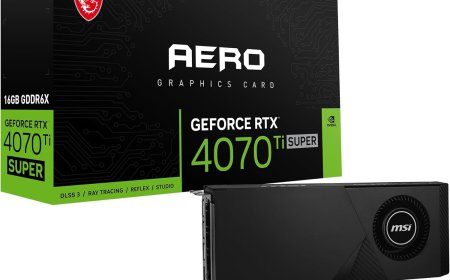






What is a GPU?
In this Article, I'll break down what a GPU is, how it differs from a CPU, and why it's essential for tasks like gaming, video editing, and machine learning.


Ever wondered how your favorite video games render those stunning landscapes, intricate character models, and dazzling special effects? Or how those mind-blowing AI art generators create images in seconds? The answer lies in a powerful component called the GPU, or Graphics Processing Unit.
This article will delve into the world of GPUs, explaining what they are, how they differ from CPUs, and why they are essential for a wide range of modern technologies.
Understanding the GPU
At its core, a GPU is a specialized processor designed to handle complex graphical calculations with incredible speed and efficiency. Unlike a CPU (Central Processing Unit), which excels at executing a series of instructions sequentially, a GPU is optimized for parallel processing. This means it can perform many calculations simultaneously, making it ideal for tasks that involve handling massive amounts of data.
Key Differences Between CPU and GPU
-
Architecture: CPUs typically have a few cores designed for sequential processing, while GPUs boast thousands of smaller, more efficient cores for parallel processing.
-
Focus: CPUs are general-purpose processors that handle a wide range of tasks, from running operating systems to browsing the web. GPUs, on the other hand, are specialized for graphically intensive tasks.
-
Memory: GPUs often have significantly more dedicated memory (VRAM) than CPUs, allowing them to store and access vast amounts of graphical data quickly.
Applications of GPUs
The power of GPUs extends far beyond gaming. They are crucial for a variety of applications:
-
Gaming: GPUs are the backbone of modern gaming, enabling stunning visuals, realistic physics, and immersive virtual worlds.

-
Video Editing and Content Creation: GPUs accelerate video editing tasks like rendering, color grading, and special effects, allowing content creators to work more efficiently.Learn more at Adobe's guide to GPU acceleration.
-
Machine Learning: Deep learning, a subfield of artificial intelligence, heavily relies on GPUs to train complex neural networks. This enables breakthroughs in areas like image recognition, natural language processing, and self-driving cars.
-
Scientific Computing: GPUs are used in scientific research for tasks such as simulations, data analysis, and medical imaging.
-
3D Modeling and Rendering: Architects, engineers, and artists utilize GPUs to create and render complex 3D models in real-time.
-
Virtual and Augmented Reality: GPUs are essential for powering immersive VR and AR experiences, providing smooth and responsive interactions with virtual environments.
GPU Architecture
Understanding the internal architecture of a GPU helps to appreciate its capabilities:
-
CUDA Cores: These are the processing units within a GPU, responsible for performing the majority of the calculations. Learn about CUDA at NVIDIA CUDA Overview
-
Streaming Multiprocessors (SMs): Groups of CUDA cores that work together to execute instructions.
-
Memory: GPUs utilize various types of memory, including fast on-chip memory (like L1 and L2 cache) and larger, slower off-chip memory (like GDDR6).
-
Clock Speed: The speed at which the GPU's internal components operate, directly impacting performance.
GPU Performance Factors
Several factors influence a GPU's performance:
-
Architecture: The underlying design and technology used in the GPU's construction play a crucial role.
-
Clock Speed: Higher clock speeds generally translate to faster processing.
-
Memory Bandwidth: The speed at which data can be transferred between the GPU's memory and its processing units.
-
Cooling: Effective cooling is essential to prevent overheating and maintain stable performance.
-
Drivers: GPU drivers are software that enables communication between the GPU and the operating system. Up-to-date drivers are crucial for optimal performance and stability.
Choosing the Right GPU
The best GPU for you depends on your specific needs and budget:
-
Budget GPUs: Offer decent performance for casual gaming and everyday tasks.
-
Mid-Range GPUs: Provide a good balance of performance and price, suitable for 1080p gaming and demanding applications.
-
High-End GPUs: Deliver exceptional performance for 4K gaming, VR, and professional applications.
GPU Overclocking
Overclocking involves increasing the GPU's clock speed beyond its factory settings to achieve higher performance. However, it can increase heat and power consumption, so it's important to proceed with caution and ensure proper cooling.
GPU Mining
Cryptocurrency mining, particularly with algorithms like Ethereum, has historically placed a high demand on GPUs. This has led to increased GPU prices and limited availability for gamers and other users.
The Future of GPUs
GPUs continue to evolve rapidly, with advancements in areas such as:
-
Ray Tracing: A rendering technique that simulates the realistic behavior of light, creating more lifelike visuals in games and other applications.
-
AI Acceleration: Dedicated hardware within GPUs specifically designed to accelerate AI workloads.
-
VR/AR Integration: Continued advancements in GPU technology are driving the evolution of immersive VR and AR experiences.
Finally!..
GPUs have become an indispensable component in the modern technological landscape. Their parallel processing capabilities have revolutionized gaming, accelerated scientific research, and powered the rise of artificial intelligence. As GPU technology continues to advance, we can expect even more groundbreaking applications in the years to come.
This article has provided a basic understanding of what GPUs are, how they work, and why they are so important. Whether you're a gamer, a content creator, or a researcher, understanding the power of the GPU can help you make informed decisions and unlock new possibilities.
FAQs
-
What is a GPU, and how does it work?
-
A GPU (Graphics Processing Unit) is a specialized processor designed for parallel processing, handling complex graphical and computational tasks efficiently.
-
-
How does a GPU differ from a CPU?
-
GPUs are optimized for parallel processing, making them ideal for handling large amounts of data simultaneously, while CPUs are designed for sequential task execution.
-
-
What are the key applications of GPUs beyond gaming?
-
GPUs are used in video editing, machine learning, scientific computing, 3D rendering, and virtual/augmented reality.
-
-
How do I choose the right GPU for my needs?
-
Consider your use case (e.g., gaming, content creation, or AI workloads) and budget. Entry-level GPUs suffice for casual tasks, while high-end models handle demanding applications like 4K gaming or VR.
-
-
What is overclocking, and is it safe for GPUs?
-
Overclocking increases the GPU’s clock speed for better performance but can generate more heat and power consumption. Proper cooling and caution are necessary to avoid damage.
-
What's Your Reaction?
 Like
0
Like
0
 Dislike
0
Dislike
0
 Love
0
Love
0
 Funny
0
Funny
0
 Angry
0
Angry
0
 Sad
0
Sad
0
 Wow
0
Wow
0